Product Search:
 |
Product Categories:
|
Hot Sell Batteries:
|
|
|
|
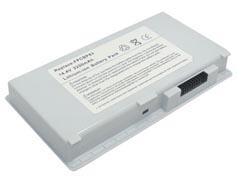
Laptop Battery for FUJITSU 0644180, FM-41, FPCBP83, FPCBP83AP
|


Email a Friend Ask Questions Add to Favorites |
| Product Code: |
KEBENFJ012 |
| Type: |
Li-ion |
| Volt: |
14.4V (Compatible with 14.8V) |
| Capacity: |
2200mAh |
| Weight: |
266g |
| Color: |
Light grey |
| Dimension: |
162.05x91.25x20.85mm |
| Condition: |
New, 1 Year Warranty! |
|
Original Price: £43.88
Special Price: £30.72 (inc. VAT)
Inventory: In Stock
|
|
|
Please ensure the battery that you are going to buy fits your laptop's brand, model number and battery's part number.
Please press 'Ctrl+F' to search for your part number/machine model.
This laptop battery can replace the following part numbers:
FUJITSU
| 0644180 |
FM-41 |
FPCBP83 |
FPCBP83AP |
|
This laptop battery is also compatible with the following models:
FUJITSU
| FMV-7515NU5/B |
FMV-BIBLO NB50J |
FMV-BIBLO NB50K |
FMV-BIBLO NB50KP |
FMV-BIBLO NB55J |
| FMV-BIBLO NB55J/T |
FMV-BIBLO NB55K |
FMV-BIBLO NB55K/T |
FMV-BIBLO NB55L/T |
FMV-BIBLO NB70G |
| FMV-BIBLO NB70H/T |
FMV-BIBLO NB75G |
FMV-BIBLO NB75G/T |
FMV-BIBLO NB75H |
FMV-BIBLO NB75H/T |
| FMV-BIBLO NB75HAV |
FMV-BIBLO NB75J |
FMV-BIBLO NB75K |
FMV-BIBLO NB75K/T |
FMV-BIBLO NB75L/T |
| FMV-BIBLO NB75L/TS |
FMV-BIBLO NB80J |
FMV-BIBLO NB80K |
FMV-BIBLO NB90J/T |
FMV-BIBLO NB90J/TS |
| FMV-BIBLO NB90K/T |
FMV-BIBLO NB90K/TS |
FMV-BIBLO NC13D |
FMV-C6200 |
LifeBook A3040 |
| LifeBook C2000 |
LifeBook C2310 Series |
LifeBook C2320 Series |
LifeBook C2330 Series |
LifeBook C2340 Series |
|
Any Battery or accessory you purchase from our website is guaranteed:
Full 1 year warranty, 30 days money back!
All batteries are made with high quality cells.
100% brand new and original manufacturer compatible.
Shopping with us is 100% secure guaranteed!
Laptop Battery Tips:
1. Please read the manufacturer's manual about the laptop battery carefully.
2. Do remember to charge your laptop battery fully after receiving it because batteries may discharge during storing and shipping.
3. Do keep laptop battery clean by a clean soft cloth, pencil eraser, or rubbing alcohol.
4. Do not try to modify or disassemble the laptop batteries pack.
5. Do not incinerate or expose battery to excessive heat.
6. Do not place the battery in device for a long period of time if device is not being used.
7. Do not short circuit the batteries pack terminals or store your battery pack with metal objects.
|
|
|
|



